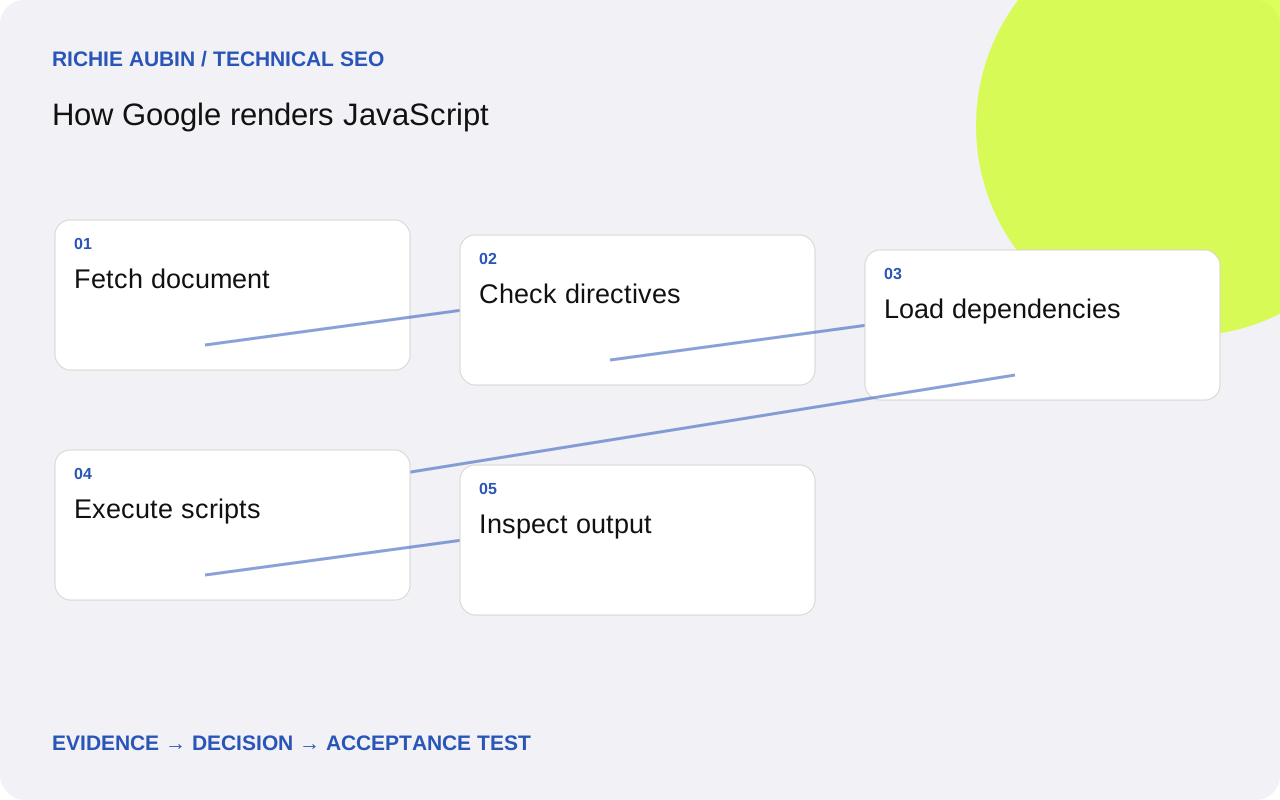
Use the pipeline to locate the failing stage
Google describes crawling, rendering and indexing as distinct phases. Its renderer uses Chromium to execute scripts and inspect the resulting document. That capability explains why browser-generated text can be processed; it does not establish that every request, component or application state will succeed on your website.
Think of the pipeline as a diagnostic map rather than a stopwatch. First ask whether the intended URL was retrieved. Then establish whether resources and application code produced the expected content. Only afterwards examine whether the page was indexed under the expected canonical. Mixing these questions makes a rendering investigation harder to resolve.
For a concrete investigation, write one sentence identifying the missing output and the affected entry path. “The public article body is absent on a fresh direct request” is actionable. “Google dislikes our JavaScript” is not. The wider JavaScript SEO guide helps decide when this pipeline investigation is the appropriate starting point.
Inspect the response before opening the browser console
Save the document status, redirect chain, response headers and HTML. Check directives in headers as well as markup. Look for the page-specific heading and a distinctive passage, not just a familiar template wrapper. Establish which information is available immediately and which information must be produced by script execution.
A successful document fetch can still deliver the wrong page. A regional redirect may lead to a different record, or a generic application shell may return for an unknown path. Compare the final address and page identity with the expected record. Separate a valid empty result from a failed attempt to retrieve a published page.
Initial exclusion directives deserve particular care. Do not design a public page around removing an initial noindex with JavaScript: Google may skip rendering when it encounters that directive. Set the intended indexability in the original response. Where exclusion is deliberate, preserve it rather than weakening controls simply to make a rendering test look successful.
Trace dependencies that contribute essential content
List the resources needed to produce the missing material: the entry bundle, route chunk, content endpoint and any configuration request. Connect each resource to an output. An analytics request failing is different from an article endpoint failing. This dependency map prevents a long network error list from becoming an undifferentiated SEO ticket.
For each essential request, record its status, response body, initiator and access requirements. Check whether a normal anonymous request receives the same usable payload as the developer’s signed-in session. A resource returning a login page with a success status can be more misleading than an explicit failure because downstream parsing may obscure the original cause.
Google’s renderer may omit requests that do not contribute to essential content, so analytics alone is an incomplete account of rendering activity. Use server observations and test artefacts to answer the specific dependency question. The missing content workflow explains how to narrow this investigation when only one component is affected.
Remove assumptions about previous visits and interaction
A deep link should initialise from its address and available public data. Inspect whether the component requires local storage, a preceding route, an accepted consent banner or a selected location. Those states may exist in a developer’s routine session but be absent during a fresh request. Record them as dependencies rather than dismissing the difference as crawler behaviour.
Google Search does not interact with a page as a visitor clicking buttons would. Keep essential landing-page content available without a click-dependent fetch. If the interface offers expandable sections, distinguish material already in the document from material fetched only after activation. The diagnostic question concerns availability, not merely whether the interface appears collapsed.
Run deliberate state comparisons: fresh context against returning context, direct request against internal navigation, default locale against an explicitly selected locale. Avoid changing all variables together. If a page starts working after a stored preference is added, investigate how that preference selects content and whether a sensible public default should exist.
Collect evidence that another engineer can inspect
A useful evidence checklist includes the requested URL, final URL, test time, deployment version, document status, response HTML, rendered HTML and screenshot. Add console errors and failed essential resources. Search for a page-specific content marker in both HTML states and record whether it appears inside meaningful article content rather than embedded application data.
Use URL Inspection or the Rich Results Test to inspect Google’s retrieved and rendered output where available. Keep live testing separate from stored indexing information. A live observation answers a present access or rendering question; an indexed snapshot may relate to an earlier deployment. Neither should silently replace the other in a report.
A local browser is useful for rapid experiments, but it is not Google’s production processing system. Match the relevant viewport and anonymous state, preserve your settings and explain what the test establishes. For repeated comparisons, follow rendered HTML testing at scale rather than relying on screenshots copied without their environment details.
Illustrative example: an article depends on a blocked endpoint
Imagine an illustrative advice site whose response contains a heading but no article body. A local signed-in browser shows the full guide. Google’s live test shows the heading and a loading message. The competing explanations are an unpublished article, a client exception, blocked resource access and a test stopping before data arrives.
The CMS confirms a published body. A clean browser reproduces the missing text, and the network trace shows that the body endpoint redirects anonymous requests to authentication. No longer wait changes that response. The evidence therefore supports an access dependency, not an unsupported JavaScript feature or a predictable rendering queue delay.
The proposed correction exposes the intended public content through an appropriate public delivery path while keeping editing endpoints private. Acceptance includes anonymous retrieval, visible body text, stable metadata and a failed-record test. Retesting Google’s output provides a relevant confirmation, but the team does not claim that the fix will force indexing or produce a specific search position.
Specify completion without inventing a rendering deadline
Require the intended public response, correct directives and complete essential content on representative direct requests. Essential resources must be accessible under the tested public conditions. Add a check that startup does not remove already delivered information and that navigation exposes real destination URLs. Document which pages were sampled and why they represent the affected code.
Do not write a ticket saying Google must render within a particular number of seconds. You control delivery and dependencies, not Google’s scheduling. Set an internal test budget appropriate to the application, label it as a testing decision and investigate timeouts separately from confirmed missing content. This gives developers a standard they can reproduce.
When links appear only after execution, check their final markup and destination behaviour. The JavaScript internal links guide covers that requirement. A complete article with unusable navigation may fix one observed defect while leaving discovery unnecessarily fragile. Keep those assertions visible in the same release review without conflating their causes.
Account for misleading signals and rollback hazards
A blank screenshot can reflect a visual overlay while the required text exists in the document. Conversely, a screenshot can display text drawn into a canvas without equivalent useful document content. Inspect both the visual result and semantic output. Different tools may also collect their snapshots at different points in the application lifecycle.
Do not interpret absent analytics events as proof of absent rendering, or a single successful test as evidence of permanent reliability. Rate limiting, cache variation and transient upstream failures need repeated targeted observations. Record uncertainty explicitly and keep the initial hypotheses until the evidence rules them out. This is more useful than assigning every exception the same severity.
Preserve the old delivery configuration before changing resource access or rendering. A hurried rollback might reinstate a private endpoint dependency or combine cached HTML with incompatible scripts. Verify the reverted route anonymously, then check access controls separately. Close the incident when the content contract is reliable; monitor subsequent search processing as an outcome with its own reporting limitations.
Frequently asked questions
Does Google render every URL immediately?
Do not assume immediate execution or a fixed wait. Google documents separate crawl and render processing, with timing dependent on its resources and decisions. Diagnose the outputs you can observe and improve unnecessary delivery dependencies. A repeated live test can establish present behaviour but cannot reveal a guaranteed schedule for all URLs.
Is text inside an API response enough?
An accessible payload is useful evidence, but it is not the same as visible article content. Check that the application inserts the intended text into the rendered document and that the text belongs to the correct URL. An unused payload or embedded state object does not prove the page presents that information.
Why does a live test differ from the indexed page?
They can represent different fetch times, deployments and processing stages. Save timestamps, version information and the tested address before comparing them. Investigate whether the live result resolves a current defect, then allow subsequent processing to occur. Avoid treating an older stored result as a current reproduction of the same failure.
Should I increase crawler waiting time until every page passes?
Use longer waits as an experiment when evidence suggests a delayed dependency. Do not use them to hide a broken request, permission requirement or unstable component. Record the readiness condition and timeout separately. A local crawler waiting longer can change its observation without demonstrating what Google will index.