Classify images by their job on the page
Separate likely primary content images, gallery alternatives, product thumbnails, editorial illustrations and decorative backgrounds. Their priorities differ. The image that dominates the initial viewport may need early discovery, while a distant illustration can usually wait. Do not apply one loading policy to every image simply because the content management system exposes a single default.
Identify the actual LCP candidate on representative mobile and desktop layouts. It may be a different crop, a text block or another component. Save the selected resource, rendered dimensions, intrinsic dimensions and request timing. Use LCP diagnostics when the main problem is delayed primary content. Also check how images contribute information: meaningful product or editorial images need appropriate text alternatives, while decorative imagery has a different accessibility role. Performance changes should preserve that distinction. A lighter file that removes necessary detail or changes the intended crop is not automatically an improvement for the person trying to inspect the content.
Make primary media discoverable without unnecessary work
Inspect initial HTML and the request initiator. A primary image address hidden behind application execution cannot be requested until that dependency resolves. Where practical, expose the initial image in markup and let scripts enhance the gallery afterwards. Do not lazy-load the confirmed above-the-fold LCP image. Check first-visit and consent states because different media can appear in each.
Use priority hints selectively. Promoting all images gives the browser little useful distinction and can compete with styles or the truly important candidate. A preload may help a critical resource that is otherwise discovered late, but its responsive configuration must match what the image eventually requests. Inspect the waterfall for duplicate or unused downloads. If the request starts early yet the image appears late, investigate visibility and rendering rather than adding more hints. The JavaScript performance guide covers gallery initialisation dependencies. Record the intended discovery sequence in the ticket so later template changes do not accidentally hide the primary resource again.
Match responsive selection to actual layout
Use responsive candidates that correspond to the image sizes the layout genuinely displays. The browser uses candidate information, layout hints and device conditions to choose a resource. An inaccurate sizes value can encourage an unnecessarily large download even when the candidate set is sensible. Inspect the selected resource in real breakpoints instead of assuming the markup proves efficient delivery.
Distinguish resolution switching from art direction. A narrow layout may need a different crop rather than simply fewer pixels. Check that alternative sources retain the intended subject and have a compatible space reservation. Product details, diagrams and text embedded in images may require different quality tolerances from decorative photography. Test several device pixel ratios and content widths, including intermediate widths between design mock-ups. A candidate ladder need not contain every possible pixel size, but it should avoid forcing common layouts to choose a grossly oversized asset. Document the supported widths and inspect the network response, not just the dimensions written in the source markup.
Choose formats and compression through visible requirements
Compare formats on representative image types, checking transferred size, visible quality, transparency and animation where relevant. A format that performs well for a photograph may not be suitable for a sharp diagram or screenshot. Keep original source assets available so later crops and re-encodes do not compound compression artefacts. Do not claim a universal percentage saving without measuring your own assets.
Check delivery headers, cache behaviour and transformation parameters. An image service can generate wasteful variants if widths and quality settings are unrestricted. Define a bounded transformation policy and ensure cache keys distinguish meaningful variants. Test error fallbacks and unsupported cases rather than assuming every request receives the preferred format. A slower response from a transformation service can offset a smaller output if generation occurs on the critical path. Compare cold and warm delivery. Preserve colour and detail needed for the page's task, especially where users rely on the image to make a product or technical decision.
Reserve space and lazy-load the right content
Declare intrinsic dimensions or an appropriate aspect-ratio strategy so the browser can allocate space before an image arrives. Confirm the ratio matches the selected crop and that responsive styles scale it correctly. Missing or incorrect dimensions can cause unexpected movement, while rigid boxes can distort images or hide content. The layout shift guide explains how to trace those effects.
Use lazy loading for suitable offscreen images, then test scrolling at realistic speeds and connections. Browser heuristics decide when native lazy-loaded media starts loading; do not rely on a single fixed distance across environments. Check that deferred content appears in time and remains available without a fragile custom script. Infinite lists and carousels need extra care because initial viewport assumptions may change after navigation or resizing. Avoid eagerly downloading every gallery alternative merely to eliminate one visible delay. Balance the likely next action with bandwidth, memory and decoding costs, and test the selected compromise in the complete gallery journey.
Illustrative example: an oversized mobile gallery candidate
Illustrative example: a product template displays its primary image at a modest mobile width but downloads the largest desktop candidate. Competing hypotheses include a faulty sizes declaration, an image-service parameter ignored by the cache and a gallery script replacing the source. Inspection shows the initial responsive choice is appropriate, then the script substitutes the original high-resolution asset during initialisation.
Test retaining responsive selection until the visitor explicitly opens the zoom view. Keep the crop, visual quality and gallery controls unchanged. Compare selected resources before and after initialisation, request counts, LCP and memory-sensitive behaviour on a representative device. Then open zoom and verify that detailed media loads reliably when needed. The experiment separates initial viewing requirements from an intentional high-detail action. It is illustrative, with no claimed client result or measured saving. If zoom now feels slow, consider a bounded preparation strategy and test its effect on loading rather than restoring all high-resolution downloads globally.
Build an evidence checklist and acceptance contract
For each important image role, record the URL, viewport, selected source, intrinsic and rendered dimensions, transferred bytes, request initiator, priority and cache state. Add the LCP candidate where relevant, dimensions reserved before load, visual quality observations and fallback behaviour. Include a slow-load recording and a failed-image case. This evidence distinguishes selection faults from delivery or rendering faults.
Developer acceptance should state which image is discoverable initially, which candidates are available, which layout hints match the template and which media may load lazily. Require no unintended duplicate requests, stable surrounding content, preserved alt text and working gallery or zoom controls. Check a meaningful set of breakpoints and content types rather than one favourable example. Link the release to performance monitoring with representative pages and field review. For search-related checks, keep meaningful images and their surrounding content accessible; an asset change does not guarantee inclusion in image search or any ranking improvement.
Recognise false positives and reverse safely
A warm image cache can make an inefficient candidate appear harmless. A laboratory viewport may select a different crop from the one affecting field users. A smaller file may arrive earlier without changing LCP because the gallery remains hidden. Treat those as competing explanations before claiming success. Compare matched conditions and inspect the actual selected resource after all scripts have run.
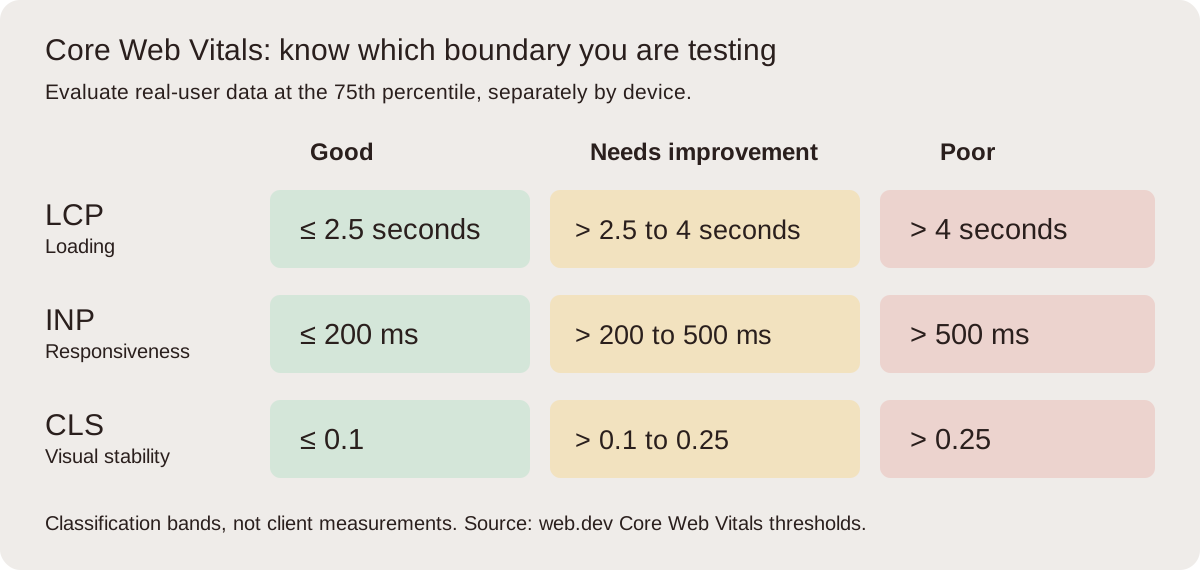
Retain original assets and previous transformation rules during rollout. Roll back if product detail becomes unreadable, crops obscure the subject, fallbacks fail or the image service returns errors. Consider cache persistence: reverting markup may still leave transformed responses or cached HTML in circulation. Avoid deleting old variant URLs immediately if documents still reference them. Review interaction and stability alongside loading so a zoom or gallery change does not shift costs elsewhere. Good field thresholds are LCP at or below 2.5 seconds, INP at or below 200 milliseconds and CLS at or below 0.1 at p75; passing them still requires a functional, useful image experience.
Frequently asked questions
Should all images use lazy loading?
No. A likely above-the-fold LCP image should be discovered and requested promptly. Lazy loading is useful for appropriate offscreen content, but test scrolling, galleries and changing viewports. A blanket policy can delay the main content or leave images appearing too late when someone reaches them.
Why does mobile download a desktop-sized image?
Check the selected source, sizes declaration, candidate widths and device pixel ratio. Then inspect whether scripts replace the initial choice or the image service ignores transformation parameters. The final markup alone may conceal an earlier duplicate download. Follow the network requests through gallery initialisation before deciding which layer is wrong.
Does a smaller file always improve LCP?
No. Discovery, server response or rendering may dominate. If the image is hidden until application startup, earlier transfer completion may leave the final paint unchanged. Compare the entire timing path and the winning element. Compression remains useful, but it should address the bottleneck you have actually established.
Can image optimisation damage usability?
Yes. Excessive compression can remove necessary detail, art direction can crop the subject and fixed dimensions can distort content. Test representative assets visually and preserve original sources. Include zoom, alt text, failed loads and responsive layouts in acceptance rather than judging the change by transferred bytes alone.