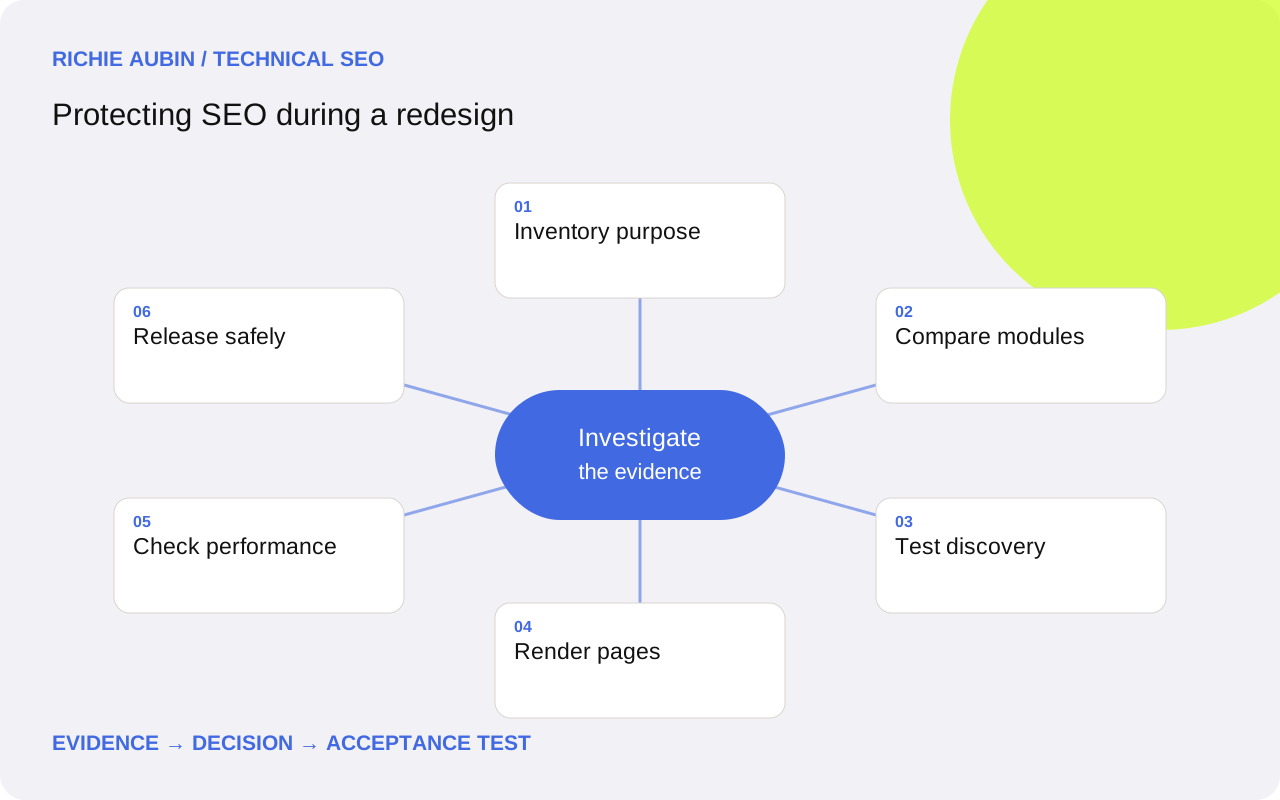
Treat the redesign as a change to page behaviour
Start with what the visitor can learn and do, not the visual difference. A new product template might remove specifications, merge tabs, replace a text link with a click handler or delay content until consent. Those decisions can change relevance and discovery even when the address and title remain familiar.
Build a component change register across page families. Identify what is retained, rewritten, moved, removed or loaded differently. Separate editorial decisions from accidental omissions. A designer may intentionally shorten a hero section while an API integration unintentionally drops the technical details below it. They need different reviews and different owners.
If the redesign also changes URLs or platform, give those changes their own tests using the migration framework. Avoid calling the entire project a cosmetic update when rendering, routing or information architecture changes underneath. The release scope determines the evidence required.
Save the evidence needed for a fair comparison
Choose representative examples across templates, content lengths, markets and user states. Include a deep page, a listing with pagination, a discontinued item, a document link and a real missing URL where relevant. Capture the old source HTML, rendered text, heading hierarchy, outgoing links, canonical and status before the old implementation disappears.
- Record the main task and distinctive information each page serves.
- List modules that contain specifications, comparisons or instructions.
- Save important navigation paths and contextual links.
- Document direct-entry behaviour and relevant consent states.
- Keep known old defects separate from desired behaviour.
This evidence checklist is more useful than a screenshot archive alone. Screenshots show presentation but may miss destinations, hidden content or response directives. Keep editorial owners involved so parity means preserving useful meaning, not copying every obsolete sentence. A redesign should allow improvement while making losses deliberate and reviewable.
Protect the information that answers the page intent
Compare substantive information module by module. A shorter page can be better if it removes repetition, but it can be worse if it loses the detail that distinguishes products or explains a decision. Ask whether a newcomer can still answer the same practical questions without contacting support or navigating elsewhere.
Pay special attention to repeated template fields. A missing specification table across a product family can matter more than a carefully rewritten introduction. Verify units, availability, prices where displayed, compatibility and policy details against the source system. Do not infer content parity from similar word counts.
Check titles, headings and descriptions for unintended generic values. A shared component can replace unique page context with the same slogan everywhere. Review changed text for accuracy as well as presence. The acceptance criterion should describe required information and relationships, leaving room for a better layout rather than freezing the old design pixel for pixel.
Keep useful paths through the new navigation
Compare outgoing links from menus, category pages, breadcrumbs and related modules. A destination may still return 200 while becoming difficult to reach because the only remaining route is a search box. Inventory links removed by simplified navigation and decide whether contextual alternatives adequately support the same journey.
Use real anchor elements with usable href values for navigable destinations. Test the rendered links and their targets rather than assuming a clickable card is a crawlable link. The internal linking audit helps distinguish intentional restructuring from newly orphaned pages.
For listings, test the first page, later pages and empty states. Infinite loading or filtering can change which detail pages appear without interaction. Record the intended discoverable URL set and verify that important items remain reachable. A sitemap is useful supporting evidence, but it does not establish that visitors can navigate to the same material.
Test direct requests and rendered states independently
Load a deep URL directly in a fresh browser session. Then compare it with navigation to the same page from within the site. Client routing can make the second journey work while a direct request fails or returns a generic shell. Repeat with the consent and authentication conditions that ordinary public visitors encounter.
Compare initial HTML with the rendered page. Essential content may depend on an API, delayed component, viewport observer or user interaction. If it is missing, test competing explanations: absent data, failed fetch, component exception, restrictive policy or a condition that never triggers. The rendered-content diagnostic guide covers that investigation in more depth.
Check that canonicals and robots instructions remain consistent through rendering. Require actual error responses for missing routes where the architecture supports them. A successful shell does not prove a valid article exists. Capture failed response and rendering evidence separately so the developer can reproduce the correct layer.
Evaluate performance as a release constraint
New design modules can introduce larger images, extra scripts and unstable reserved space. Test representative templates on realistic mobile conditions and inspect the causes of regressions. An attractive hero can delay the main content; a carousel can add interaction work; a late banner can shift a purchase button.
Core Web Vitals good thresholds are LCP at or below 2.5 seconds, INP at or below 200 milliseconds and CLS at or below 0.1, assessed at the 75th percentile in field data. Lab tests support diagnosis before release, but they do not establish future field performance. Use the Core Web Vitals guide to separate those roles.
Compare equivalent pages under equivalent test conditions and inspect actual interactions. A single synthetic score can conceal a slow menu or form. Where staging has no representative field audience, document that limitation and plan post-release observation. Do not promise that reaching a performance threshold will preserve a particular search position.
Illustrative example: specifications disappear into a selector
Illustrative example: a manufacturer redesigns product pages with a cleaner hero and an interactive model selector. The old pages exposed dimensions and compatibility notes below the introduction. The new component loads them only after a model choice, even when the direct URL already identifies the model.
One hypothesis is that content was intentionally consolidated; another is that the selector initialisation has lost the URL-to-model relationship. Compare a direct visit with an in-site selection and inspect the data request. If choosing a model reveals the missing information, the team has evidence about the triggering condition rather than a vague concern about JavaScript.
The acceptance test requires the direct model URL to show its agreed specifications without an unnecessary selection. Other variants must remain navigable, and the page must preserve its correct canonical. This example illustrates a component regression and testable repair; it does not report client work or claim a measured ranking outcome.
Agree acceptance, limitations and rollback before launch
Developer acceptance should cover substantive content, usable links, correct metadata, direct-entry responses and critical interactions across changed templates. Add representative performance comparisons and a genuine missing route. Pair automated assertions with editorial review: a machine can detect a missing table but cannot reliably approve a rewritten explanation.
Expect false positives. Renamed headings may be editorial improvements, and hidden interface labels may inflate extracted text without adding useful content. A staging API may differ from production. Identify those limitations explicitly, then resolve release-critical dependencies instead of accepting every difference or dismissing all extraction warnings.
Version components and content changes so a faulty module can be reverted without restoring an entire old database. Broad rollback risks losing edits, orders or newly published pages. Prefer a narrow repair when evidence identifies the failed component. Use the release QA process for reproducible tickets, then review production content and business journeys after deployment. Visual sign-off is one part of release acceptance, not its conclusion.
Frequently asked questions
Can a redesign hurt SEO if URLs stay the same?
Yes. Content, internal links, rendering and response behaviour can change independently of URLs. Compare the information and journeys each template provides before and after release. Stable addresses remove one mapping problem but do not establish that the new pages serve the same purpose.
Must every word from the old design be retained?
No. Preserve useful meaning and evidence, while allowing deliberate editorial improvement. Record major removals and who approved them. Word-count parity is a poor substitute for checking whether important instructions, distinctions and specifications still answer the page intent.
Are accordion sections automatically an SEO problem?
No. Test how the content becomes available rather than judging the interface label. An accordion containing available text differs from one that fetches essential information only after a click. Verify the actual rendered behaviour and accessibility, and preserve a clear route to the information for visitors.
Should we delay launch until field performance data exists?
A private preview generally cannot provide representative production field data. Use lab diagnostics and functional testing to prevent obvious regressions, state the remaining uncertainty and monitor after release. Existing field data describes the previous experience until enough new visits are represented.
What is the safest response to a faulty redesign component?
If the fault is isolated, restore or repair that component and verify the affected templates. Reverting the whole site may introduce content and transaction risks. Keep rollback scope explicit and retain evidence so the team can confirm that the specific failure is resolved.